P1 · Source-led guide · 2026-10-23
FSR 4.1 upscaling and blurry shares: follow the image through two different pipelines
Game upscaling operates while a frame is being made. Sharing can change that finished frame afterward. Diagnose those stages separately before treating a compressed screenshot as evidence about a console's rendering quality.
image workflow · entry-point
Game upscaling operates while a frame is being made. Sharing can change that finished frame afterward. Diagnose those stages separately before treating a compressed screenshot as evidence about a console's rendering quality.
For our product, a saved game frame is the starting point for character style conversion into a DLSS 5-style visual reference, delivered through DLSS 5 Studio. Checking poor-quality shared pictures is only a limited entry point here; it does not define the product, and the style-redraw workflow is separate from in-game FSR upscaling.
TL;DR
- The Xbox news concerns rendering support, not the quality of every shared picture.
- Preserve a capture before export, messaging, or social-media processing.
- Our real test compresses a browser screenshot, then submits that file for enhancement.
- The result changes text and surfaces; it cannot measure FSR or recover gameplay history.
Keep these notes with the files
- Capture record: the saved reference before sharing.
- Distribution record: export format, dimensions, and the received file.
- Editing record: the exact submitted derivative and the completed output.
What the October announcement establishes
VGC reported on October 21, 2026 that Xbox Series X/S and Xbox ROG Ally X were set to receive AMD's FSR 4.1 technology. We treat that as a report about forthcoming support, without turning it into a claim that every installed game already uses the feature. Read VGC's report.
For the technical distinction, AMD's developer materials describe FSR Upscaling separately from frame generation and other rendering components. That separation helps avoid using the word upscaling for every operation in a graphics pipeline. We did not run an Xbox, a handheld benchmark, or an FSR integration for this article. AMD GPUOpen FSR Upscaling.
An announcement about fsr 4.1 upscaling does not tell you how a specific uploaded screenshot was encoded. The file could have been resized, recompressed, cropped, or captured from a video player after rendering finished. Those changes are questions about that file's history, and they require their own evidence.
Follow the handoffs instead of judging one thumbnail
Imagine a game renders a scene, an upscaling stage contributes to the displayed image, and a capture function saves a frame. A person exports that capture, sends it through a chat app, and someone else screenshots the preview. The final picture may contain changes from several steps that the viewer cannot separate by appearance alone.
This sequence is an illustrative workflow, not a measured description of any named platform. Different capture settings and sharing routes behave differently. If you want to test one route, keep the files from before and after it. A generic statement that all screenshots are heavily compressed would be as unhelpful as blaming every artifact on the game.
The rendering question
A rendering investigation needs a controlled game build, settings, scene, and capture method. Temporal behavior also requires more than a single still. A screenshot cannot establish frame pacing, motion stability, or how reconstruction behaves when previously hidden surfaces become visible. Those are separate observations to collect.
The sharing question
A sharing investigation begins with an already saved image. Compare its dimensions, format, and bytes with the received file. Inspect fine lines and text at matched sizes. If the sent and received files differ, document the intervening steps before assigning the visible change to a specific encoder or application.
Our actual experiment uses an owned browser screenshot
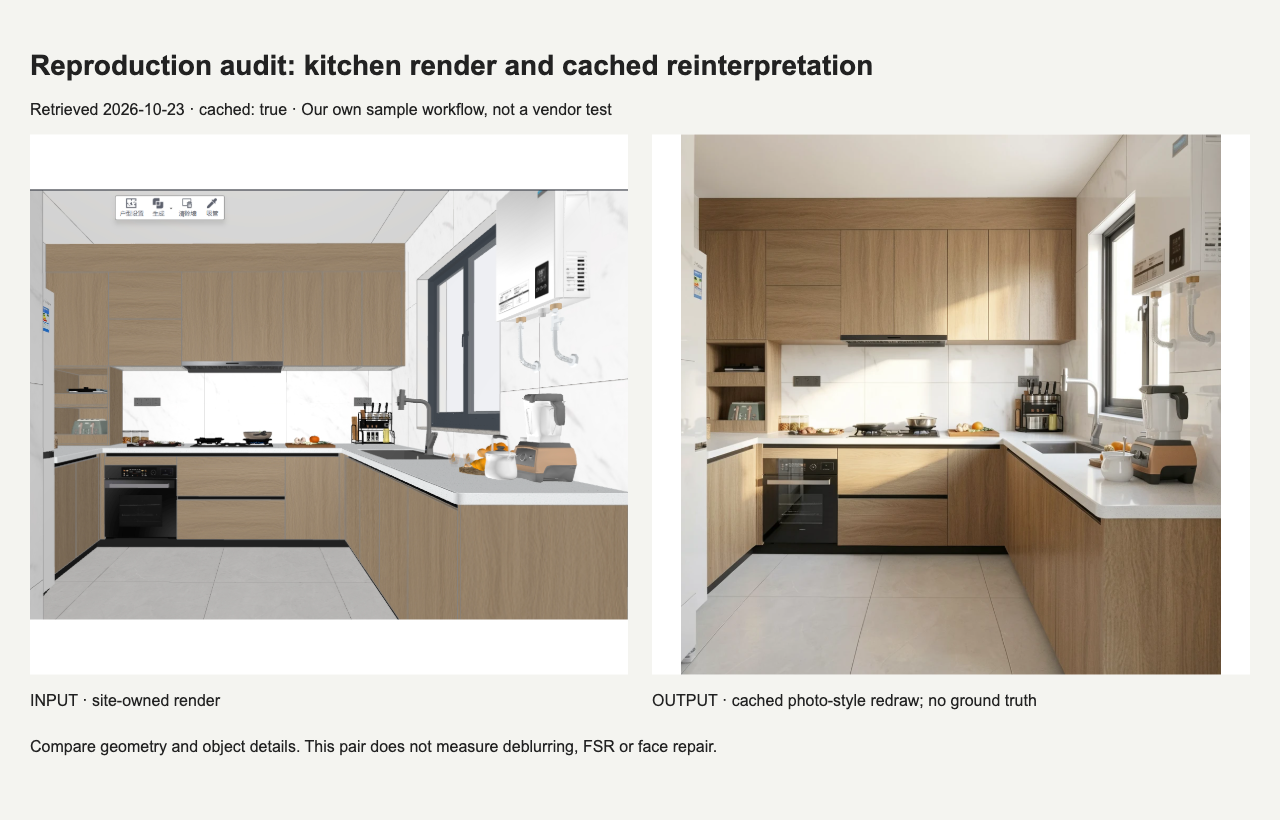
We built a local inspection page from our own kitchen render and its cached photographic redraw. We captured that page in Chromium at a viewport of 1280 by 820 pixels. It contains ordinary interface text, thin edges, and detailed surfaces, making it useful for checking a sharing-like degradation without using a game or a vendor image.
The page itself is a test subject. The kitchen comparison inside it is not an FSR comparison. Its labels describe that earlier cached example. In the next stage, we deliberately treat the entire page, including those labels, as the input to a new image-processing operation.
We also saved the same page as JPEG with Chromium's quality setting at 25. This value is an encoder setting, not a percentage of visual quality and not an estimate of what a social network uses. The viewport and page content stayed the same between those captures.
Then we submitted that exact compressed JPEG to our flux-klein enhancement workflow. The request used a target size of 1536 by 992 pixels, seed 42, and four inference steps. These values are experiment settings recorded in the request manifest, not comparative performance measurements or recommended universal settings.
What the completed enhancement actually shows
The new task succeeded, and we saved the output bytes and their hash. This was a fresh request, separate from the cached kitchen example depicted inside the screenshot. The source screenshot was 1280 by 820; applying the configured target enlargement with the size ceiling and alignment produced the requested 1536 by 992 output.
The output changes visible content. The top heading contains altered lettering, the date line is rewritten, and small captions become unreliable. Wood grain and other surfaces also receive a new interpretation. These observations are visible in this particular result; they do not establish an error rate across images or models.
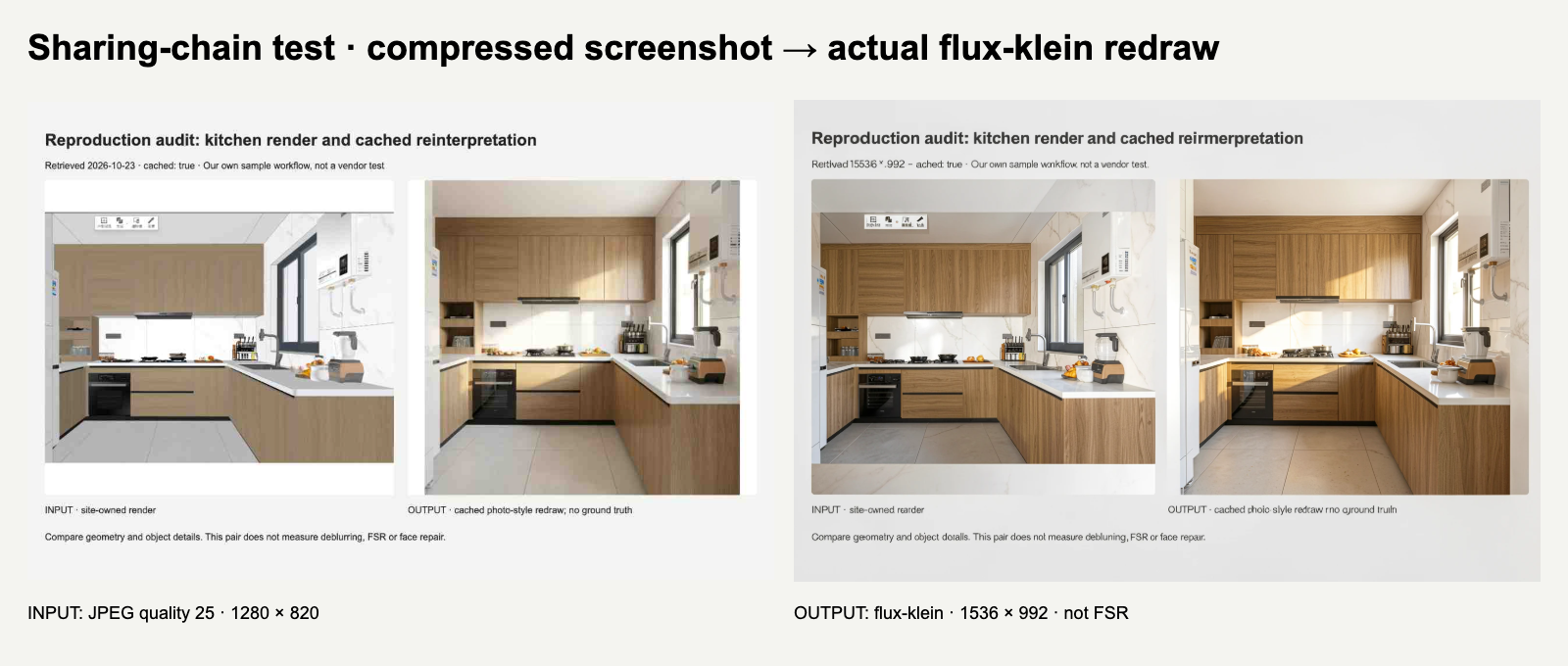
The result can look more detailed while being less suitable for preserving a screenshot as a record. In particular, generated lettering cannot serve as evidence of what the interface originally said. We keep the request JSON outside the image because the image's own labels have passed through generation.
A useful conclusion is limited and actionable: this output should not replace the original capture when exact text matters. We do not infer that every enhancement fails, that every shared screenshot needs enhancement, or that the observed changes say anything about AMD's renderer.
Reproduce the experiment in separate stages
Capture and encode
- Open the included assets/audit.html file in Chromium. It embeds the source images, so the inspection page can be viewed without fetching outside artwork.
- Set the browser viewport to 1280 by 820 and device scale to one. Wait until both images have decoded and the text is visible.
- Save one PNG screenshot, then one JPEG screenshot with quality 25, without changing page position. The accompanying capture script records this procedure.
- Open both captures at the same display width. Keep the PNG as the reference; do not replace it with another screenshot of a preview.
The JPEG in the package is the exact input we submitted. If your browser or encoder version differs, the bytes may differ too. Record your version and hashes rather than claiming byte-identical reproduction across environments. The purpose is to preserve the relationship between the source and each derivative.
Run and inspect enhancement
- Upload the compressed JPEG to your authorized enhancement workflow. Save the request settings and the input hash before submitting.
- For a matching configuration, use flux-klein, the recorded prompt and dimensions, seed 42, and four inference steps. Our manifest preserves those values; availability depends on your own access.
- Download the actual returned image. Record its dimensions and hash, and retain errors if the operation fails.
- Compare the output against both the compressed input and the PNG reference. Read the title and date character by character before assessing surface detail.
Reproducing settings does not guarantee identical generated pixels. Service revisions and implementation details can affect results. This package gives you our exact output for inspection and a procedure for collecting another run honestly. It does not require you to buy console hardware to test the sharing stage.
Choose the smallest repair that meets the purpose
If a received picture looks poor, ask for the original file before processing it. If the only problem is a small display preview, download and inspect the attachment. If you control the export, preserve an uncompressed or lossless master and create distribution copies from that master.
When you need a presentation image and accept newly generated detail, enhancement can be evaluated as an editing choice. When you need an exact UI record, keep the capture unchanged and use a larger crop or explanatory text outside the image. An image generator should not become the authority for reading an ambiguous label.
For a gameplay complaint, keep the original recording and document capture settings. Do not turn one enhanced frame into evidence about fps or latency. For an attractive personal still, clearly label substantial edits. The same source can support different uses when the derivative and its purpose remain explicit.
Where a still-image tool fits
Our image upscaler page addresses saved images. It does not insert fsr 4.1 upscaling into a game. The configured enhancement uses flux-klein redraws, with target factors of 2× or 4×, a 1536-pixel maximum edge, and dimension alignment to multiples of 16. A cap can reduce the achieved enlargement.
If you arrived through fsr 4.1 upscaling news, use that distinction to choose your next experiment. Rendering questions need rendering evidence. Sharing questions need the capture and its derivatives. Our screenshot test belongs to the second category, and its visible text changes explain why retaining the first file matters.
Limits and independence
This test cannot predict Xbox or ROG Ally performance, prove a game's FSR support, reconstruct missing motion, or guarantee recovery of compressed detail. It is one documented redraw of one owned browser screenshot. This article links to our own tool and serves our site's audience. We are independent and not affiliated with NVIDIA, AMD, Microsoft, Xbox, ASUS, or VGC.
Related reading
Read the documented style-conversion case · Open the existing-image tool
Try the free AI image tool · Check the source-linked GPU evidence