P0 · · 2026-10-23
DLSS 5 style conversion: turn a saved game frame into a reviewable visual reference
DLSS 5 style conversion lets you explore another lighting, palette, and material direction from an existing frame. Keep the source beside the redraw and reject changes to the character, costume, or text that your brief requires preserved.
style conversion · neural redraw
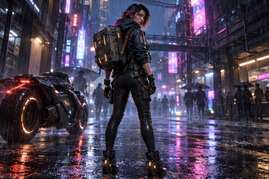
No-login cached example: character style comparison
DLSS 5 style conversion lets you explore another lighting, palette, and material direction from an existing frame. Keep the source beside the redraw and reject changes to the character, costume, or text that your brief requires preserved.
TL;DR
- Use the source to define the character and the prompt to describe the desired visual change.
- Treat silhouette, clothing construction, HUD, and written content as acceptance criteria.
- Our real example is an original synthetic character, not a screenshot from a commercial game.
- The retrieved result changes recognizable features, so it needs review rather than automatic approval.
What a style reference is useful for
A saved frame gives an artist a concrete starting point: a pose, a camera, a character, and a relationship between subject and background. A redraw can explore how that arrangement reads under another lighting or material treatment. It can make a discussion about visual direction more specific than a list of adjectives.
For example, a team may want to judge the balance between colored reflections and the readability of dark clothing. A reference can help them discuss that choice. It cannot establish how the final game will render the same scene, how animation will behave, or whether the design can be implemented without further work.
On our game-character-style page, the task is independent image-based style conversion. The phrase DLSS 5 describes the intended visual-reference direction here; this browser example does not run or benchmark NVIDIA's game runtime. Studio is a delivery form for the wider workflow, not the definition of the image transformation.
Separate the subject from the changes you want
Keep a recognizable character
Before assessing the result, identify the character's outer contour and the landmarks that make the costume recognizable. A backpack, a coat opening, the placement of a strap, or the outline of hair can matter more than the overall amount of detail. Name those elements in the brief and keep them visible during review.
A direction such as cinematic lighting is not permission to replace the face or redesign the equipment. If a change crosses that boundary, record it as a departure from the brief. You can still discuss the new image as a different concept, but it should not silently become the approved conversion of the original character.
Describe the intended visual language
Style can involve the color of bounced light, the transition between highlight and shadow, the roughness suggested by a surface, or the relationship between background colors. These are things a viewer can compare. Write a brief that explains which of them should change and which should remain consistent.
A large list of competing effects makes the result harder to evaluate. For a practical review, pick a direction and define its visible consequences. This is an editing recommendation, not a measured claim that shorter prompts always produce better output. The actual prompt used in our example is saved with the files.
The example we actually retrieved
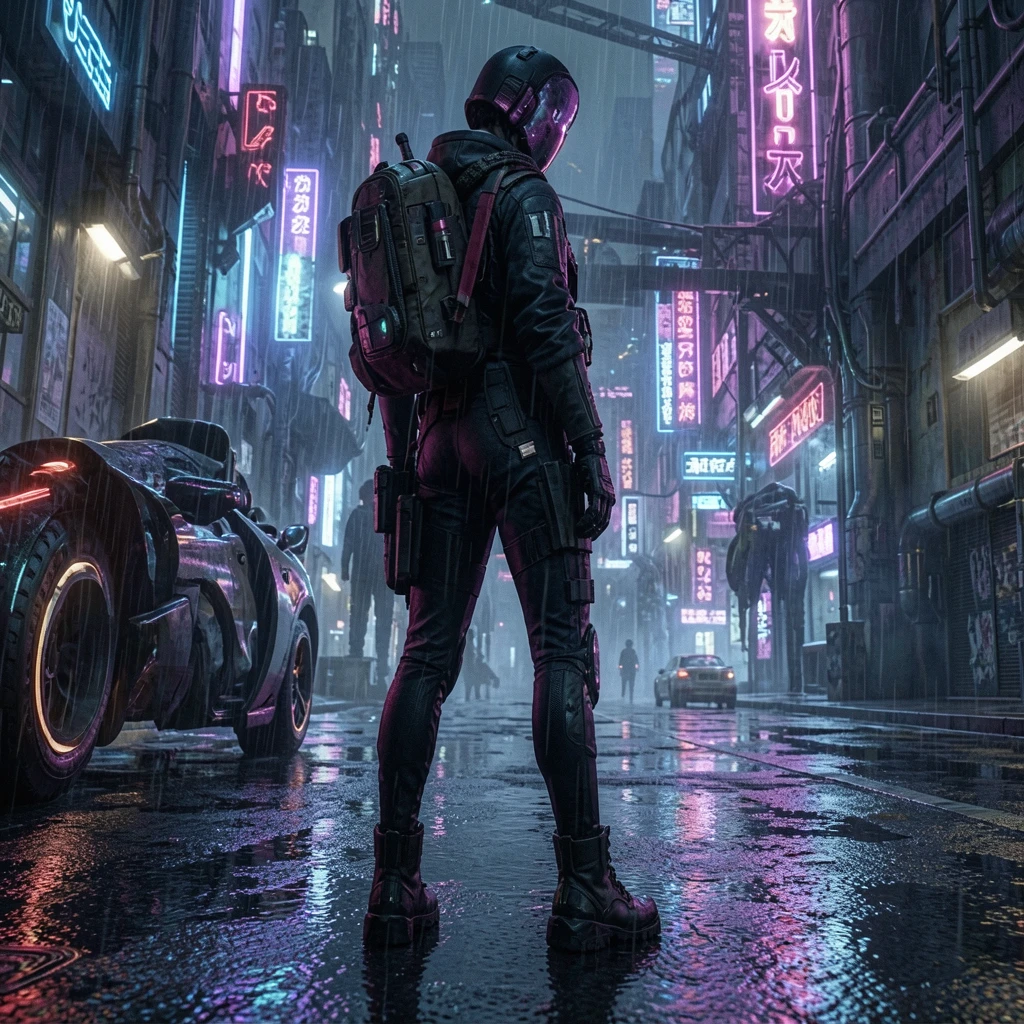
We requested the public characterStyle example and saved the successful response. It identified the source image, fixed prompt, result endpoint, and cached status. We downloaded the source and returned image. This repeats access to a stored result; it is not a fresh inference experiment or a claim of repeatable generation.
The source is the site's original synthetic cyberpunk character reference. It is not footage from a named game, and we did not acquire a third-party screenshot for this article. Its prompt asks to preserve silhouette and costume while using cyberpunk cinematic lighting, wet pavement, neon reflections, and no text.
The result keeps a rainy neon-street direction and a standing character, but that broad resemblance is not enough for approval. The output depicts a helmeted head where the input exposes a face and hair, and the framing differs. Those visible departures matter if preserving identity and silhouette was required.
Read the scene text as content
The output contains sign-like characters despite the prompt's no-text instruction. We do not transcribe them or infer that they reproduce the source signs. Text-like marks are visible generated content, and a prompt that asks to avoid them is not proof that the instruction was obeyed.
This example contains no game HUD. It therefore cannot establish HUD preservation. For your own authorized frame, health values, counters, subtitles, menu labels, and control hints must be checked against the source. If exact lettering matters, a generated approximation fails that requirement even when the rest of the image looks coherent.
Reproduce the retrieval and inspection
The following commands are the public request-and-download sequence used for this article. Run them in a new directory with curl available. The package also includes our response and file hashes, so a reader can distinguish the recorded version from a later cache update.
curl --fail --silent --show-error \
  -H 'Content-Type: application/json' \
  -d '{"sample":"characterStyle"}' \
  https://www.dlss5nvidia.com/api/image-edit/samples -o run.json
curl --fail --silent --show-error \
  https://www.dlss5nvidia.com/examples/generated/game-cyber-1-before.jpg -o input.jpg
curl --fail --silent --show-error \
  'https://www.dlss5nvidia.com/api/image-edit/samples?sample=characterStyle' -o output.webp
Read run.json before opening a result. A failed or unfinished response should stay in the record as such. If the service changes its sample, preserve your new bytes separately rather than presenting them as the output shown here. Matching a stored file confirms which image you inspected; it does not validate the model's understanding of the brief.
We reused the content library's capture script to render an inspection page containing the exact source and result. The script and its execution record are included. That repeatable browser view helps check the pair without depending on an online slider. It does not represent another model run.
Make the review concrete
- Read the saved prompt and identify the requested change and preservation constraints.
- View the full input and output together before zooming into a favorable region.
- Follow the head, shoulders, clothing outline, and equipment across the pair.
- Check any written content independently from lighting and material appearance.
- Save a decision that names the departures rather than simply calling the output better.
These are the inspection actions used on this pair. We have not run a separate experiment that removes a HUD, restores a face, or guarantees a particular prompt correction. Any further edit needs its own source, output, and review record.
Decide what to keep from a mixed result
A reference can contain an interesting light direction and an unacceptable character change at the same time. Keep those judgments separate. You may retain the image as a discussion of neon reflections while rejecting it as a faithful conversion of the supplied character. Its caption should say which use remains valid.
Do not crop away a changed head and then present the remaining jacket as proof that the whole character was preserved. A local crop answers a local question. The complete pair must remain available to anyone making the broader decision about costume and identity.
For a production handoff, name the elements approved as inspiration and the elements excluded from reuse. An artist can then interpret the light or material treatment without inheriting an accidental redesign. The practical output is a reviewable reference and a clear brief, not a claim that a generated image is already a finished game asset.
Where prompts and references fit
Black Forest Labs documents image editing with text and image references. Its image-editing documentation supplies general background for that kind of workflow; it does not verify the behavior of our recorded sample or make it a NVIDIA rendering result.
For a later task involving more than one image, the BFL multi-reference explanation describes assigning content across references. Our character example uses a single source and a fixed prompt. It cannot establish what a second reference would have changed, so we do not invent that comparison.
The value of dlss 5 style conversion lies in making a visual direction available for inspection. The acceptance decision still depends on the source and the brief. Searchers looking for dlss 5 style conversion should be able to find both the transformation and the evidence that limits its use.
Boundaries and independence
This article does not promise unchanged identity, correct HUD text, exact geometry, commercial asset readiness, temporal consistency, or in-game performance. It documents one cached synthetic-character redraw and an inspection workflow. We operate the linked site, and the page serves our own product audience. We are independent and not affiliated with NVIDIA, AMD, or Black Forest Labs; no third-party artwork is used in these figures.
Try the free AI image tool · Check the source-linked GPU evidence