P1 · 2 min read · November 2026
How to save a frame from a video as a PNG
Open a clip, select a frame by time and save it as a PNG. Follow real screenshots from the browser-based Video Frame Extractor.
Video Studio · Video frame extraction

Need a thumbnail, a reference image, or a still for review? Open the video in the frame extractor, move to the moment you want, and click Save PNG. The file contains the video frame without the player buttons or timeline.
You can also save a game frame as a reference for Studio’s style converter. The extractor only captures the still; the style conversion is a separate step.
1. Open a clip
Click Open video file to select a clip from your device. If you just want to see how it works, click Open sample. The screenshots use a short clip we made. You can follow the same steps with the built-in street clip.
2. Pick the frame you want
Use the player to get close to the moment you want, then pause. Drag the Review time slider beneath the player and wait for the preview to catch up. If you're picking a thumbnail, check a nearby moment on either side. Look for a moment when the subject is easy to see and any text you want to keep is readable.
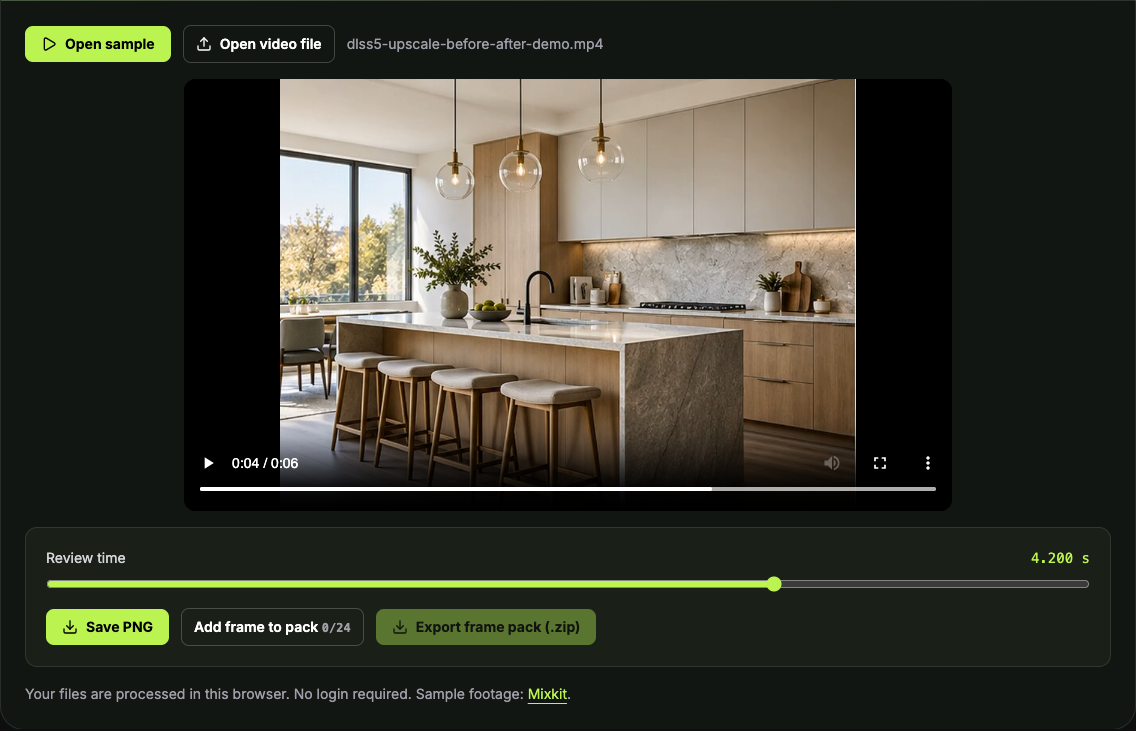
3. Click Save PNG
Once the preview shows the frame you want, click Save PNG. In this walkthrough, the downloaded file was a 1280 × 720 PNG, matching the source clip’s dimensions. The dimensions of your own export depend on the source video.
If the still looks blurry: Try a nearby frame. Saving a frame as a PNG preserves the picture already in the video; it cannot remove motion blur or recover detail lost to compression. If the file won't play, try a browser-compatible copy such as an H.264 MP4.